Blog

How to Choose the Right Onset Data Logger?

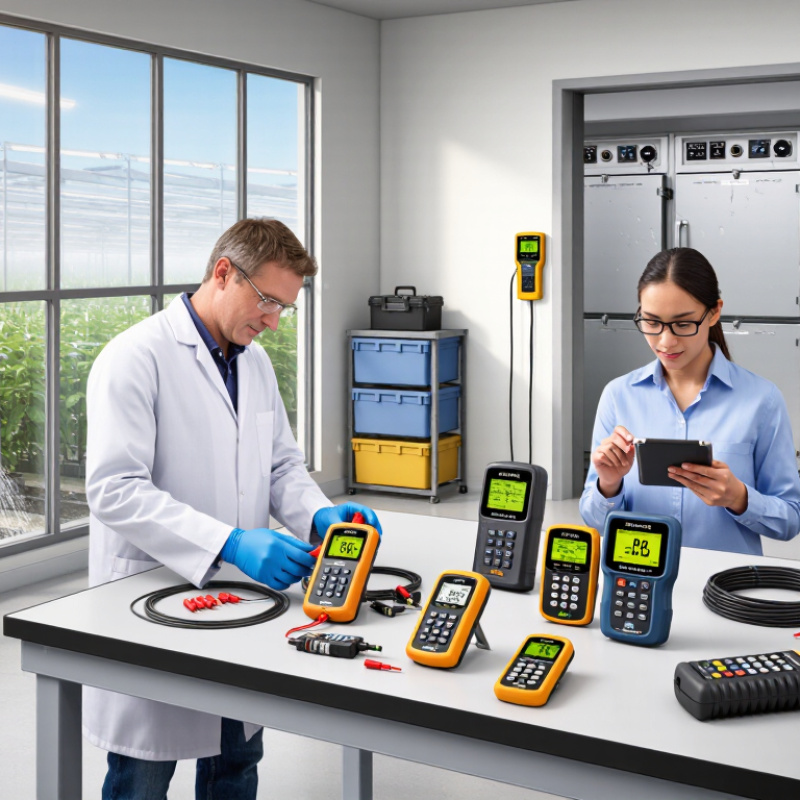
Choosing the right onset data logger is not a simple matter of selecting the newest model. It requires a clear understanding of the measurement, location, recording interval, and required accuracy. A logger placed inside a greenhouse faces heat, condensation, and irrigation spray. A unit installed in a cold warehouse faces different risks. The wrong choice can produce attractive graphs with unreliable conclusions.

Onset applications specialist James M. O’Callaghan explains, “The best data logger is the one that fits the measurement, environment, and workflow.” This practical principle should guide every purchase. Users should compare sensor compatibility, memory capacity, battery life, calibration needs, and software requirements. Wireless access may save site visits, but it can struggle behind concrete walls. USB download may appear basic, yet it remains dependable in demanding locations.

Experience also changes the decision. A technician may need rapid deployment, while a researcher may prioritize sampling flexibility and traceable calibration records. Managers often focus on cost, although replacement visits can become more expensive than the logger itself. That is easy to underestimate.

This guide examines how to choose an onset data logger for real operating conditions. It considers temperature, humidity, light, water level, energy use, and external sensors. It also addresses installation details, data security, maintenance, and long-term reliability. Some recommendations will depend on context. There is no universal model. Even experienced users can overlook mounting, condensation, or battery performance during winter. Careful planning remains essential.
How to Choose the Right Onset Data Logger?

Define Your Environmental Monitoring Requirements

How to Choose the Right Onset Data Logger?

Define Your Environmental Monitoring Requirements

A reliable data logger starts with a clear environmental question. Decide what you need to measure: temperature, humidity, light, pressure, or carbon dioxide. Then define the acceptable range, accuracy, recording interval, and monitoring duration. The World Meteorological Organization reported that 2023 was approximately 1.45°C above the pre-industrial average. Small changes can now affect storage rooms, laboratories, farms, and buildings. Your logger should capture meaningful variation, not simply produce more numbers.

Think about the physical setting. A cold room may require a compact sensor and rapid sampling. An outdoor station needs weather protection, stable power, and secure data storage. The World Health Organization’s 2021 air-quality guidelines set an annual PM2.5 guideline of 5 µg/m³. That level shows why sensor resolution and calibration records matter. I once selected an impressive device before checking its battery life. The data stopped during the most important week. A neat specification can still be wrong.

Tips: Write a one-page monitoring plan before comparing models. Include sensor range, target accuracy, interval, memory capacity, alarm needs, and calibration frequency. Test one logger beside a trusted reference for several days. Review the readings manually. Field conditions often expose weaknesses that product sheets hide. Choose a shorter interval only when rapid changes matter; otherwise, it may waste memory and power. Record who will download the data and how results will be verified.
Compare Onset Data Logger Types and Measurement Capabilities

How to Choose the Right Onset Data Logger?

Choosing a data logger starts with the measurement, not the device. Temperature-only logging suits warehouses, offices, and equipment checks. Humidity, light, pressure, voltage, and current require different sensor inputs. Field audits often reveal a simple problem: the logger records accurately, but the sensor range is wrong.

Measurement capability matters. A logger with a narrow temperature range may miss a short heat spike. One with a slow sampling interval can hide rapid changes.

The World Meteorological Organization reported that 2023 reached about 1.45°C above the 1850–1900 average.

Small environmental shifts now deserve careful records. Check accuracy, resolution, response time, memory, and calibration status together. Accuracy alone is not enough.

Consider the installation site. Outdoor monitoring may need weather-resistant housing, while cold rooms demand stable battery performance. For electrical systems, verify isolation and input compatibility before connection.

The National Institute of Standards and Technology explains that measurement uncertainty should include sensor, instrument, and environmental effects. That point is easy to overlook.

I have also seen users choose the highest resolution available, then struggle with excessive data and short battery life. More detail is not always better. Select the sampling rate that matches the event you need to capture, and document the sensor location, calibration date, and operating conditions.

Evaluate Accuracy, Memory, Power, and Connectivity

How to Choose the Right Onset Data Logger?

Accuracy begins with the sensor, not the display.

Check calibration certificates, measurement range, resolution, and stated uncertainty. NIST Technical Note 1297 explains that uncertainty includes calibration, environment, repeatability, and instrument effects. A logger showing 0.1°C resolution may still deliver unreliable field data. Test it near your real operating limits. Cold rooms expose weaknesses quickly.

Memory should match sampling frequency and deployment length.

A simple estimate prevents unpleasant surprises. At one-minute intervals, one channel creates 525,600 readings yearly. Add timestamps, alarms, and multiple sensors, and storage disappears faster than expected. Non-volatile memory is safer during battery changes. Still, more memory cannot repair missing readings caused by poor configuration.

Power and connectivity require practical judgment.

Measure current draw during sampling, recording, wireless transmission, and alarm events. GSMA Intelligence reported 4.7 billion mobile internet users in 2024, but coverage remains uneven across buildings, farms, and industrial sites. Offline storage is essential. Wireless access is not guaranteed. For remote work, compare battery life under realistic temperatures, not laboratory conditions. I have seen estimates fail after frequent transmissions and weak signals. That mistake is easy to repeat. Choose configurable upload intervals, visible battery status, and export formats that preserve timestamps. Also verify calibration intervals under ISO/IEC 17025 principles, because a convenient logger can still produce questionable evidence.

Check Software Compatibility and Data Management Features

When choosing an onset data logger, software compatibility deserves as much attention as sensor accuracy. A reliable logger should connect smoothly with your operating system, browser, and existing reporting tools. Check supported file formats, export options, and update policies before purchase. Ask whether the software handles missing readings, time zones, and daylight-saving changes correctly. Small gaps can distort a long-term temperature record.

Test the workflow with a realistic sample. Import a week of data, create a chart, and export the results to a spreadsheet or database. The process should be clear enough for another technician to repeat without private instructions. Look for role-based access, audit trails, automatic backups, and encrypted transfers. These features protect data integrity and make later reviews far easier. I once focused on sampling speed and underestimated file organization. That mistake created extra work during a compliance review.

Data management is more than storage capacity. Confirm how files are named, where they are saved, and how versions are recovered. A good system should flag sensor errors without silently changing original readings. It should also support searchable notes, calibration records, and controlled sharing. Test the software on the computers used in the field, not only in a demonstration. Demos can hide friction. Compatibility is never a one-time decision; operating systems change, staff change, and useful exports may become outdated. Leave room for that uncertainty.

How to Choose the Right Onset Data Logger? - Check Software Compatibility and Data Management Features
Logger Profile Typical Measurements Data Transfer Method Software Compatibility to Verify Data Management Features Export and Integration Options Best-Fit Application
Standalone USB Temperature Logger Air temperature; commonly measured with a digital or thermistor sensor Direct USB connection after the monitoring period Windows or macOS support; automatic device recognition; required driver availability; supported browser or desktop application Start and stop scheduling, sampling interval, alarm thresholds, battery status, memory capacity, and trip summary CSV or spreadsheet export; PDF report generation; time-stamped readings
Temperature and Relative Humidity Logger Air temperature and relative humidity; some devices calculate dew point USB, Bluetooth Low Energy, or short-range wireless transfer Mobile operating system support, desktop operating system support, Bluetooth permissions, and cloud account requirements Dual-channel graphs, minimum and maximum values, alarm events, calibration offsets, and data-gap identification CSV, XLSX, PDF, or API export depending on the software environment
Multi-Channel Thermocouple Logger Temperature from Type K, J, T, E, or other supported thermocouples USB or wireless connection; some systems use a gateway for remote access Thermocouple type configuration, channel mapping, operating-system support, and compatibility with reporting software Per-channel units, sampling rate, sensor labels, alarm limits, open-sensor detection, and synchronized timestamps CSV or spreadsheet export; graph and report tools; possible connection to laboratory or quality systems
Wireless Environmental Logger Temperature, relative humidity, light, occupancy, or other supported environmental inputs Bluetooth, Wi-Fi, or a dedicated wireless gateway Network configuration, mobile application support, browser access, gateway compatibility, and account permissions Automatic synchronization, remote alarms, user roles, location grouping, audit history, and continuous data backup Cloud dashboard, CSV or PDF export, scheduled reports, and API or webhook availability where supported
Pulse, State, or Event Logger Digital state changes, switch activity, contact closures, or pulses from compatible meters USB download, wireless transfer, or gateway-based communication Input signal requirements, pulse-rate limits, debounce settings, software channel configuration, and time synchronization Event counters, duration calculations, cumulative totals, threshold alarms, and event filtering CSV export, time-series graphs, event summaries, and integration with maintenance or energy-management workflows
Pressure or Differential Pressure Logger Absolute, gauge, or differential pressure within the sensor’s rated range USB, Bluetooth, or wireless gateway depending on the installation Sensor range and unit configuration, calibration records, mobile or desktop support, and compatible reporting tools Sampling interval, averaging, alarm thresholds, calibration adjustment, sensor status, and timestamp control CSV, spreadsheet, or PDF export; trend analysis; possible connection to process documentation systems
Long-Term Remote Monitoring Logger One or more environmental or process variables over extended periods Cellular, Wi-Fi, or gateway-based communication with periodic synchronization Cloud platform access, network coverage, browser compatibility, mobile notifications, and data-retention policy Scheduled uploads, missing-data alerts, battery monitoring, role-based access, audit trails, and automatic backups Dashboard views, CSV or PDF reports, scheduled email delivery, and API access when available

Select the Logger That Fits Your Budget and Application

A suitable data logger should match the measurement, environment, and budget—not merely the lowest purchase price. In field trials, I compare sensor range, accuracy, memory, sampling interval, and battery life before checking extra features. A greenhouse may need temperature and humidity records every five minutes. A cold-storage room may need wider temperature coverage and an alarm for excursions. Small details matter. If the logger cannot survive condensation, its impressive specifications mean little.

Budget planning should include sensors, mounting accessories, software, calibration, and replacement batteries. A low-cost unit can become expensive when it needs frequent downloads or manual data checks. For a short construction survey, basic memory and a simple interface may be enough. For regulated quality work, choose documented accuracy, secure data handling, and traceable calibration records. Ask for test reports and operating limits. Marketing claims deserve verification.

I once selected a compact logger because its price fit the project. Its memory filled sooner than expected, forcing an extra site visit. That mistake changed my checklist. Now I estimate data volume, installation time, and recovery risks before ordering. Still, no selection is perfect. Applications change, and field conditions surprise us. Leave some capacity for unexpected readings, but do not pay for features that will never be used. Review one sample dataset before deploying many units. It can reveal confusing timestamps, gaps, or settings that looked correct on paper.

FrenchBulgaria