
NOTICE
We use cookies to improve the user experience and analyze its performance.
An Industrial PC can be the quiet backbone of a production line. It may sit beside a conveyor, inside a control cabinet, or near equipment that vibrates through every shift. Unlike an office computer, it is selected for its operating environment and workload. The right choice can support reliable monitoring, machine control, and data collection. But rugged appearance alone does not guarantee a good fit.
Industrial systems engineer Daniel Mercer offers this illustrative expert perspective: “Choose the computer for the conditions it must survive, not just the applications it must run.” That distinction matters. Buyers should examine temperature limits, vibration resistance, available ports, mounting options, and long-term component availability. A plant using serial-connected sensors has different needs from a site running machine-vision software. Small details count. A missing port can mean an added adapter, extra wiring, and another point of failure.
This guide explores why businesses choose an Industrial PC, what to assess before purchasing, and where costs can hide. It also considers maintenance, expansion, and support over the equipment’s working life. There is no universal best model. A fanless unit may reduce dust-related concerns, yet still need careful thermal planning. That trade-off is easy to overlook. The goal is not to buy the toughest-looking computer; it is to match verified specifications to real operating conditions, then review that decision as the business changes.
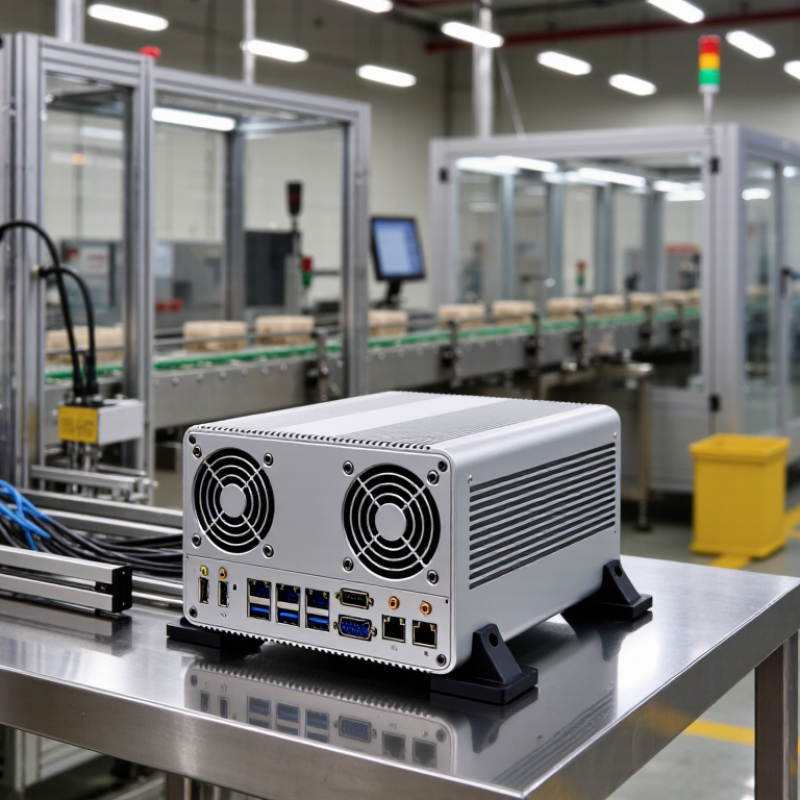
An industrial PC is a computer engineered to keep working where ordinary office equipment may struggle. Its defining features are not just a metal case. Look at the full design: supported temperature ranges, resistance to vibration, power-input tolerance, and the way components are cooled. A unit mounted beside a production line may face dust, machine movement, and brief power fluctuations. Dust happens. A sealed enclosure can help, but it does not make every system suitable for every site.
Connections and service life matter, too. Industrial PCs often provide practical I/O, such as serial ports, Ethernet, or isolated inputs for control equipment. Mounting options may include DIN rail or a panel cutout, depending on the installation. Check the published specifications and test conditions; “rugged” alone says very little. Some systems offer long component availability, which can reduce redesign work when a replacement is needed years later. That benefit depends on the supplier’s actual lifecycle policy. Fanless models can reduce moving parts, but they may still need clear airflow and careful heat planning. It is easy to over-specify a computer, then discover that the chosen ports or temperature rating do not match the real installation.

Consumer computers are built for offices, homes, and predictable indoor conditions. Industrial PCs are designed for tougher operating environments, such as factory floors, kiosks, and vehicle systems. Their enclosures and components may tolerate wider temperature ranges, vibration, and airborne dust. The exact limits depend on the model, so check specifications against the real installation site.
Small details matter. A machine mounted beside a conveyor may face constant vibration, while a unit inside a sealed cabinet may struggle with heat. Industrial systems often offer sturdy connectors, mounting options, and cooling designs suited to these conditions. Some use fanless layouts, which reduce moving parts but still need sensible airflow. Dust matters.
Consumer computers can be easier to replace and may cost less upfront. Industrial models can cost more, and their parts may be less convenient to upgrade. Yet a failed office PC and a failed control-station computer can have very different consequences. Match the hardware to the task, not just the label. A rugged case alone is not proof of reliability; installation, maintenance, and thermal testing matter too. I would not assume every industrial PC is automatically the better choice.
Industrial-grade computing suits businesses whose computers operate in harsh or demanding environments. A packaging line may run three shifts beside motors that shake the control cabinet. A warehouse terminal may face cold loading bays, dust, and repeated handling. These conditions can shorten the life of ordinary office equipment. Downtime is expensive. Industrial PCs are often used for machine monitoring, process control, barcode workflows, and local data collection. Their robust enclosures, secure mounting options, and broader temperature tolerances can help keep these tasks running.
The right fit depends on the actual workplace, not just the industry name. Manufacturers, transport facilities, utilities, and outdoor service teams may benefit when equipment faces vibration, heat, dust, or near-continuous use. But a quiet office with stable temperatures may not need rugged hardware. It is easy to over-specify a system; higher durability does not make every workflow faster. Check operating temperatures, available ports, mounting space, maintenance access, and how long the system must remain in service. A fanless design may reduce dust intake, for example, but heat still needs a clear path away from the device. One detail can be missed. Test the computer in its intended location before standardizing it across a whole site.
Businesses operating around dust, water, or frequent washdowns may need an industrial PC with an appropriate enclosure rating. The chart compares the two digits in selected IP codes: the first rates solid-particle protection and the second rates water protection. These are classification levels, not measurements of performance.
IP54 is commonly suited to environments where protection from dust and splashing water is needed; IP65 adds dust-tight protection and resistance to water jets; IP67 indicates dust-tight protection and temporary immersion protection under specified test conditions. Confirm the exact rating and operating limits in the product datasheet.
An industrial PC can keep production data close to the machines that generate it. It can collect sensor readings, display alarms, and run control applications in one rugged enclosure. That helps operators spot a rising temperature or a stalled conveyor without waiting for a remote server. Sealed designs and wide-temperature components can also suit dusty factory floors and warm equipment cabinets. Still, rugged hardware alone cannot prevent downtime.
The World Economic Forum’s 2023 Global Lighthouse Network report describes digital factory programs that achieved up to 50% higher productivity and 30% lower energy use. These results came from broader digital transformations, not from industrial PCs alone. An IPC can provide part of that foundation by processing data locally, reducing dependence on network connections, and supporting faster decisions. In practice, benefits depend on software, maintenance, and how well the system fits existing equipment. That part is easy to underestimate.
Tips: Match the PC’s operating-temperature range, ingress protection, and mounting method to the actual site. Check interfaces before buying; one missing serial port can mean extra adapters and another failure point. Record temperatures and reboot events during a pilot. Small annoyances matter.
Evaluate an industrial PC against the conditions it will actually face. Note the ambient temperature, dust, vibration, available space, and operating hours. A unit beside a warm production line needs different thermal capacity from one in a clean office. List the software, ports, and devices it must support. A mismatch can be costly, even when the processor looks powerful on paper.
Check the specifications, but verify how they apply to your workload. Compare processor performance, memory, storage endurance, and expansion options with the applications you plan to run. Confirm that connectors match your cameras, sensors, or control equipment. Ask about operating temperature ranges, maintenance access, replacement parts, and technical support. If possible, test the system in a representative setup before deployment. One overlooked detail is cable clearance; it can complicate installation later. I would not assume that the highest-rated model is the best fit. More capacity may add cost without improving reliability.
Tips: Write down your workload and site conditions before comparing models. Request test results for demanding applications. Check how easily filters, drives, and cables can be reached. Leave room for growth, but keep the budget honest.